Hydrogen AI Recipes
Copy-paste commands for the most useful agent jobs.
On this page
- Metadata recipes
- 1. Fill missing meta descriptions site-wide
- 2. Audit duplicate titles, then fix them
- 3. Shorten titles that get truncated
- 4. Rewrite one description for a goal (post-scoped)
- Schema recipes
- 5. Add FAQ schema to a page
- 6. Apply Article schema across posts
- Redirect recipes
- 7. Create one redirect
- 8. Create redirects for a list of moved URLs
- 9. Find and fix broken internal links
- Image recipes
- 10. Bulk alt text
- 11. Generate a featured image (post-scoped)
- 12. Set OG images for recent posts
- Sitemap and robots recipes
- 13. Exclude thin pages from the sitemap
- 14. Noindex a set of pages
- 15. Turn on the video sitemap and scan for videos
- Tips for better runs
- FAQ
- Do these prompts have to match word-for-word?
- What confirmations will I actually see?
- Can the agent do things outside these categories?
- Related reading
This page is a copy-paste library for Hydrogen AI: real prompts, what the agent does with each, and what confirmation to expect. Every recipe below stays inside the agent's actual tool surface, which covers metadata, schema markup, sitemaps, robots rules, redirects, image alt text, and featured images. Paste them into the chat in Hydrogen SEO → Dashboard (site-wide) or the agent tab of the editor's SEO Settings sheet (scoped to the current post).
Under the default policy the agent asks before anything destructive; you can set it to ask before every write, or run read-only. See AI Abilities, policies and safety. Agent work consumes credits from your account (credits and billing).
Metadata recipes
1. Fill missing meta descriptions site-wide
Write meta descriptions for every post missing one.
The agent finds posts with no meta description, drafts one per post grounded in the actual content, and writes them through the metadata tools. Expect it to show you the descriptions it is writing; under "ask before every write" you confirm each one. Review results later in SEO titles and meta descriptions.
2. Audit duplicate titles, then fix them
Find pages that share the same SEO title, then rewrite the duplicates so every title is unique.
First a read (the duplicate report), then writes. The agent shows which titles it plans to change and to what. Duplicates also surface in site audits.
3. Shorten titles that get truncated
Find posts whose SEO titles are longer than 60 characters and shorten them without losing the main keyword.
Read, then per-post title rewrites, shown before saving.
4. Rewrite one description for a goal (post-scoped)
In the editor's SEO Settings sheet agent tab:
Rewrite this page's meta description to mention the free plan and stay under 155 characters.
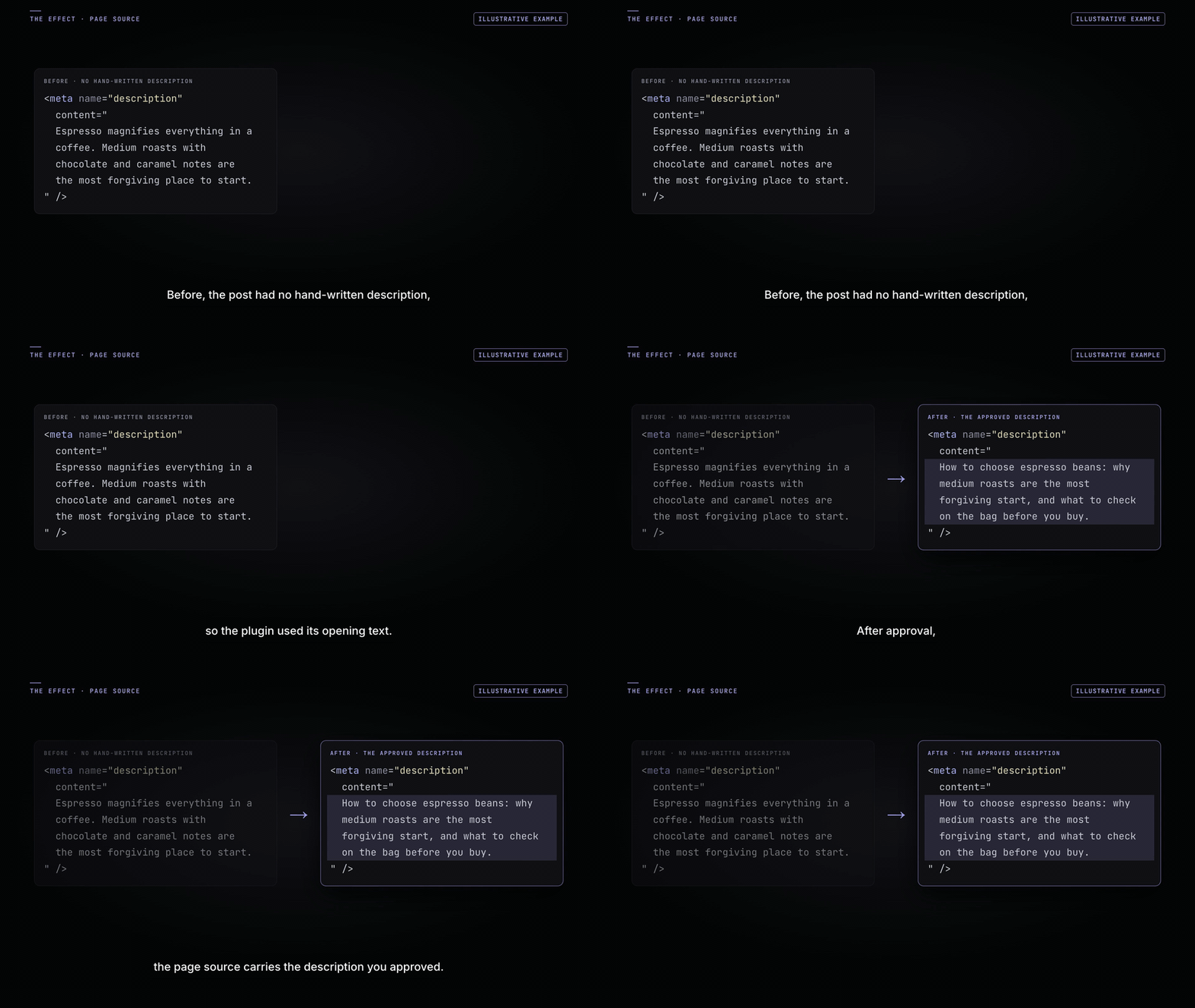
A single write to the current post's description; you'll see the new text before or as it lands, per your policy.
Schema recipes
5. Add FAQ schema to a page
Add FAQ schema to this page using the questions and answers already in the content.
The agent extracts Q&A pairs from the page and writes an FAQ JSON-LD block through the schema tools. Confirm the pairs it lists. Background: FAQ and HowTo schema.
6. Apply Article schema across posts
Make sure every blog post has Article schema.
The agent checks which posts lack it and adds Article schema where missing, reporting the affected posts. See schema markup overview.
Redirect recipes
7. Create one redirect
Set a 301 redirect from /old-pricing to /pricing.
One write to the redirection manager. Creating redirects changes where URLs resolve, so expect a confirmation. See 301 vs 302 redirects.
8. Create redirects for a list of moved URLs
Create 301 redirects for these moved URLs: /services/design → /design /services/dev → /development /team-old → /about
The agent creates each redirect and lists every mapping it made. Verify afterwards in the redirection manager.
9. Find and fix broken internal links
Find broken internal links and fix them.
The agent reads the broken-link findings, then proposes fixes such as redirecting dead URLs to their live equivalents. Because this changes URL behavior, expect confirmation before the fixes are applied. Related: find and fix 404s.
Image recipes
10. Bulk alt text
Add alt text to every image in the media library that doesn't have any.
The agent works through images missing alt text and writes descriptive alt attributes, showing its progress. Also available as the bulk ◆ Generate Alt Text button in Media → Library; see image alt text.
11. Generate a featured image (post-scoped)
Generate a featured image for this post that matches its topic.
An AI image is generated and set as the featured image. Image generation consumes credits; you see the result before moving on.
12. Set OG images for recent posts
Set an Open Graph image for my ten most recent posts that don't have one.
The agent fills the social image metadata for those posts. Check the results with the live previews in social share previews.
Sitemap and robots recipes
13. Exclude thin pages from the sitemap
Exclude the /tag/ archives and the thank-you page from the XML sitemap.
Writes sitemap exclusions; the agent confirms exactly what will disappear from the sitemap. See XML sitemaps.
14. Noindex a set of pages
Set the robots meta on my search results and cart pages to noindex.
Per-page robots meta writes. Robots changes affect indexing, so expect a confirmation listing the pages. Background: robots meta settings.
15. Turn on the video sitemap and scan for videos
Turn on the video sitemap for posts and pages, then scan my existing posts for videos and tell me how many have one.
Updates the video settings through update-sitemap-settings, then drives the scan-sitemap-videos ability (start, step, status) and reports the count. The YouTube API key, if you set one, is never shown to the agent. See the video sitemap.
Tips for better runs
- Be specific about scope: "every post", "pages in the Guides category", "my ten most recent posts".
- State constraints: character limits, keywords to keep, tone.
- Start read-only on a new site: ask for the audit first, then re-run with writes enabled.
- Review afterwards in the normal screens; agent edits live in the same fields as manual ones.
FAQ
Do these prompts have to match word-for-word?
No. The agent understands plain language; the recipes are starting points. Scope and constraints matter more than exact phrasing.
What confirmations will I actually see?
Under the default policy, the agent proceeds with routine reversible edits and asks before anything destructive (redirect changes, robots changes, bulk operations it flags). Under "ask before every write" you confirm each change. Every change is shown either way, and you can stop mid-run.
Can the agent do things outside these categories?
Its tools cover metadata, schema, sitemaps, robots rules, redirects, alt text, and featured images. Requests outside that surface (editing theme files, for instance) are out of scope by design.