Your First 30 Minutes with Hydrogen SEO
The highest-impact things to fix right after installing.
On this page
- Minute 0–5: Run the site health score
- Minute 5–15: Fix duplicate and missing meta
- Minute 15–20: Set your homepage SEO
- Minute 20–24: Submit your sitemap
- Minute 24–28: Set your social defaults
- Minute 28–30: Redirect known moved URLs
- After the first 30 minutes
- FAQ
- Do any of these steps need a hydrogenseo.com account?
- My health score is low — should I panic?
- How often should I re-run audits?
- Related reading
You have installed the plugin and finished (or skipped) the setup wizard. If you filled in the wizard's Business Profile, your Organization schema basics are already in place; its Finish step listed what was set up. Here is the highest-impact half hour you can spend next, in priority order: run the health score, fix duplicate and missing metadata, set your homepage SEO, submit your sitemap, set social defaults, and redirect any URLs you know have moved. None of these steps needs an account.
Minute 0–5: Run the site health score
- Open Hydrogen SEO → Dashboard.
- Look at the site health score at the top (click Refresh Checks to run the checks again). It averages seven areas — crawlability, performance, mobile, security, content structure, schema markup, and technical health.
- Read the category cards below the score: each lists its issues, marked warning or critical, with a hint on how to fix them. Start with the critical ones. The rest of this guide covers the fixes that appear most often on new sites.
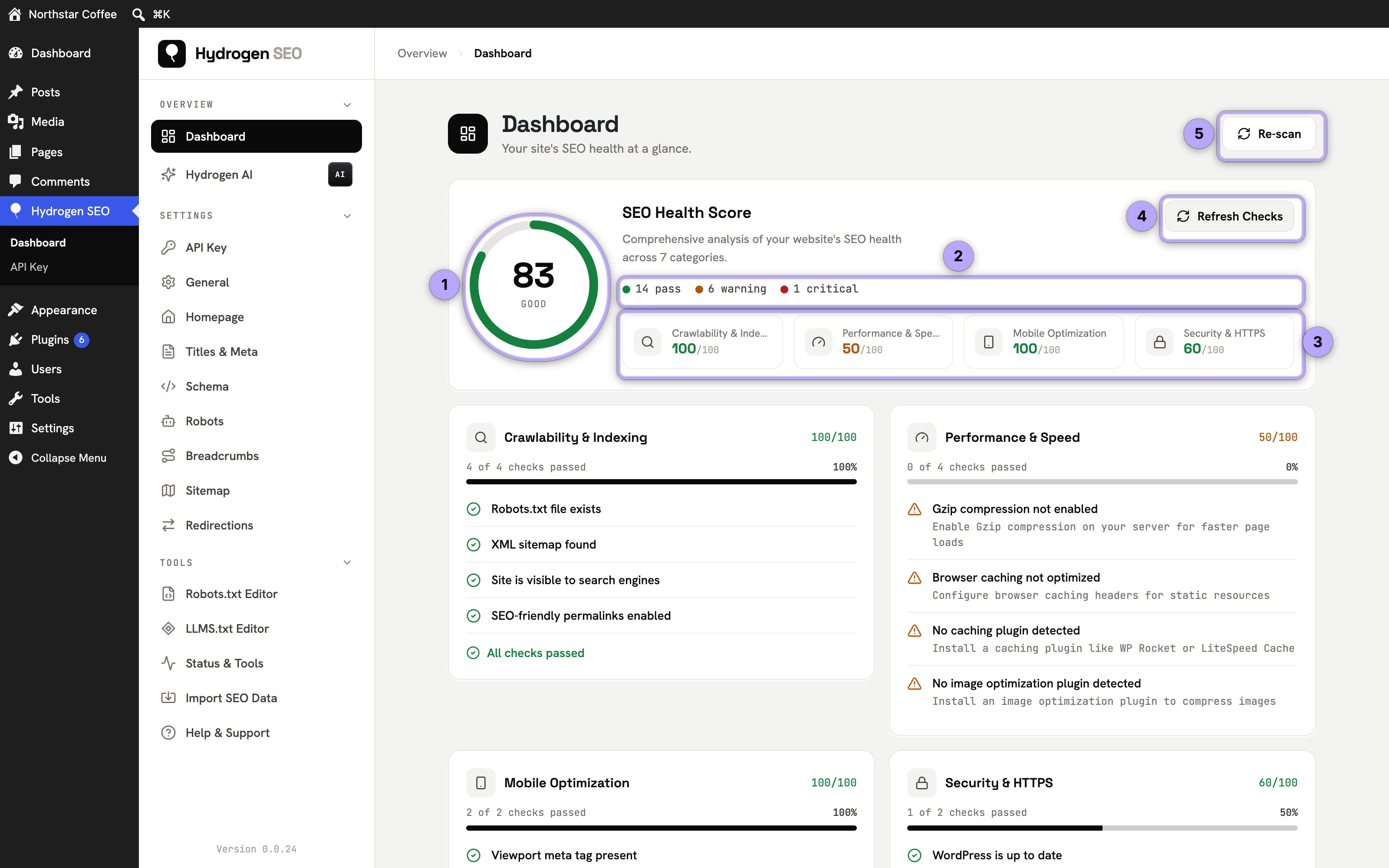
Details on interpreting each area are in site health score.
Minute 5–15: Fix duplicate and missing meta
Duplicate titles and descriptions dilute your pages against each other; missing ones let Google improvise. The site-wide audit finds both.
- Run a site audit from the dashboard (guide). It flags duplicate titles and descriptions, metadata that is too long or too short, keyword cannibalisation, orphan pages, and broken internal links.
- Fix templates first. In Titles & Meta, set sensible templates per post type using smart tags — type
@in any field to insert variables like%title%,%separator%and%site_name%(template variables). Pick your Title Separator and Capitalization once under Titles & Meta → General. Good templates eliminate whole classes of duplicates at once. - Then fix the stragglers. Posts → All Posts shows each post's score, focus keyword and whether its title and description are its own or the template's; the SEO filter above the list narrows it to poor scores, posts with no focus keyword or noindexed posts, and Quick Edit changes the title, description and keyword in place (SEO on the Posts screen). For a post that needs more, open the editor's SEO Settings sheet and watch the Google SERP preview as you type (SERP preview).
- If you have a connected account, ask the Hydrogen AI tab in the sheet, or the agent for many posts at once, to draft titles and descriptions (AI titles and descriptions).
One caution: if another SEO plugin is still active, you may be seeing literal duplicate meta tags in your page source rather than duplicate content. That is a different problem — see fix duplicate meta output.
Minute 15–20: Set your homepage SEO
Your homepage is usually your most-linked page, and its title is your brand's headline in search.
- Open the homepage settings in the dashboard (homepage SEO).
- Write a homepage title that leads with what you do, not just your name, and a description that earns the click.
- Check the SERP preview, then Save.
Minute 20–24: Submit your sitemap
Hydrogen SEO generates an XML sitemap automatically, with image entries and caching built in.
- Open the Sitemap screen and copy your sitemap URL.
- Open it in a browser to confirm it loads (troubleshooting if it 404s).
- In Google Search Console, go to Sitemaps, paste the URL, and submit. Full walkthrough: submit your sitemap to Google.
Not verified in Search Console yet? Add a URL prefix property, choose the HTML tag method and paste the tag into Webmaster Tools (under Settings); the same screen takes Bing's code. See Webmaster Tools.
Minute 24–28: Set your social defaults
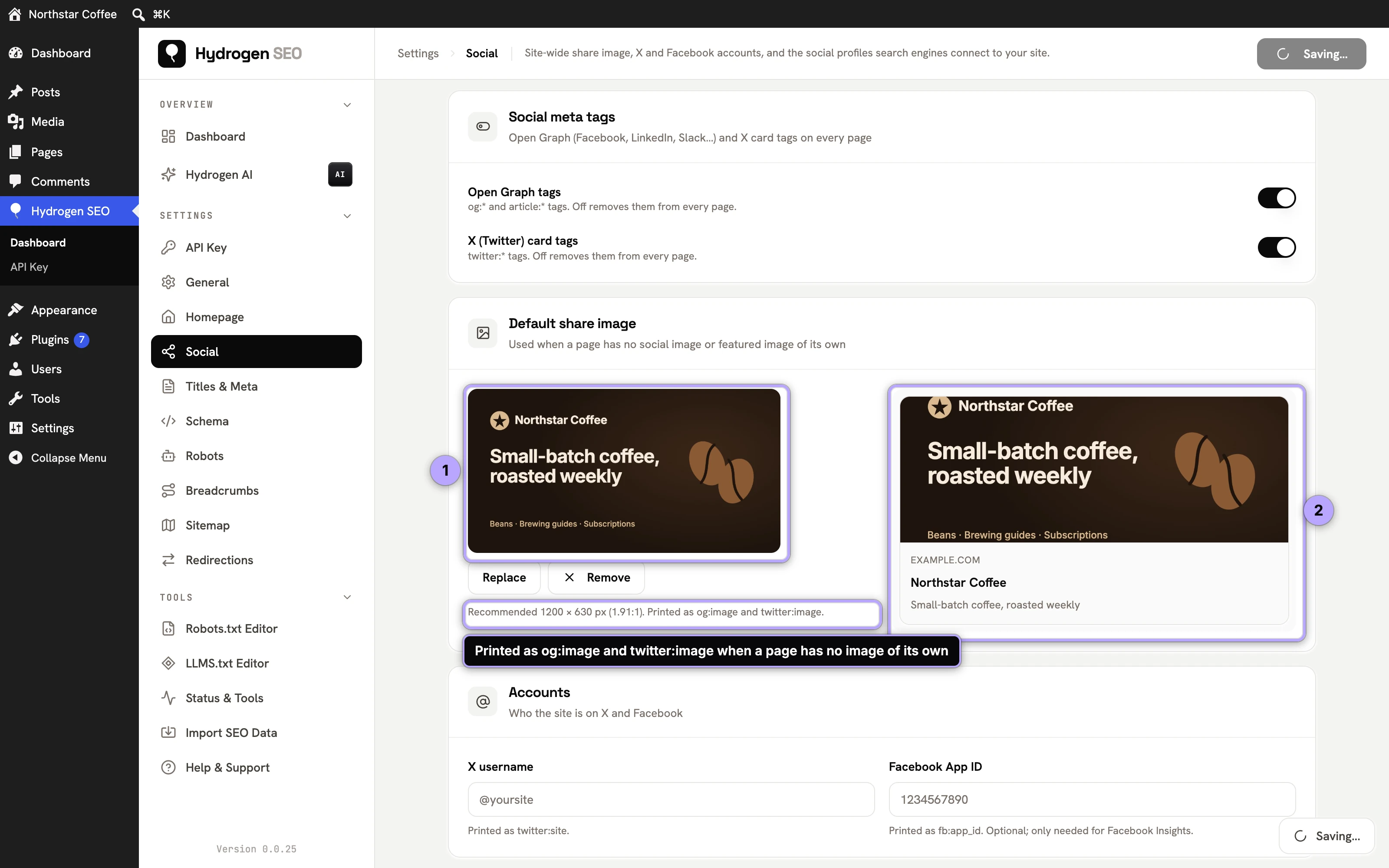
When someone shares a page that has no social settings, the defaults decide how it looks on every platform.
- Open Hydrogen SEO → Social (social settings).
- Leave Open Graph tags and X (Twitter) card tags on, and choose a default share image (1200×630 pixels) for pages that have no image of their own.
- Add your X username and your social profiles. They become
twitter:siteand thesameAslist of your Organization schema. - Save, then check a post's share-card previews in its SEO Settings sheet (social share previews).
Minute 28–30: Redirect known moved URLs
If you have changed permalinks, deleted pages, or migrated from another platform, every old URL you know about deserves a redirect now — before the 404s accumulate.
- Open Redirections.
- Add a 301 redirect from each old path to its new home (301 vs 302 redirects).
- For 404s you don't know about yet, see find and fix 404s.
- If the site was installed before WordPress 6.4, it probably still has a page for every upload. Switch on Redirect Attachment Pages under General → Permalinks to send them to their posts (attachment page redirects).
After the first 30 minutes
With the fundamentals in place, the next tier of wins: add schema markup to your key content types, publish llms.txt guidance for AI crawlers, and — if you want the work done for you — connect Hydrogen AI and ask it to work through the issues the score lists.
FAQ
Do any of these steps need a hydrogenseo.com account?
No. The health score, audits, templates, homepage SEO, sitemap, social defaults, and redirects all work with no account. Only the AI suggestions and the Hydrogen AI agent need a free account.
My health score is low — should I panic?
No. The score exists to prioritize, not to judge. Start with the critical issues; most new installs improve quickly once templates, sitemap, and redirects are in place.
How often should I re-run audits?
After any significant change (template edits, migrations, bulk publishing) and periodically otherwise. Audits are read-only and fast, so there is no cost to running them often.