Canonical URLs
Tell search engines which URL is the definitive version of a page.
On this page
- What rel=canonical actually does
- The default behavior
- When to set a custom canonical
- Set a per-post canonical
- Common mistakes
- FAQ
- Does a canonical tag pass link equity like a redirect?
- Should every page have a canonical, even with no duplicates?
- Can I canonicalize to a URL on a different domain?
- How do I check what canonical a page is outputting?
- Related reading
A canonical URL tells search engines which version of a page is the definitive one. Hydrogen SEO outputs a rel="canonical" tag on every page automatically, pointing at the page's clean permalink, and lets you override it per post in the SEO Settings sheet when a page needs to credit a different URL. The tag is server-rendered into the page's <head>, so crawlers always see it in the raw HTML.
What rel=canonical actually does
The same content is often reachable at more than one URL: with and without tracking parameters, through category paths, via a syndication partner, or as a near-duplicate variant. Search engines treat each URL as a separate page unless told otherwise, which splits ranking signals across duplicates and lets Google choose the "real" version for you.
The canonical tag is your vote: "of all the URLs where this content appears, index and credit this one." It is a strong hint, not a command; Google usually honors a sensible canonical and ignores a nonsensical one. It consolidates signals; it is not a redirect and does not stop users from visiting the other URLs. When you actually want visitors moved, use the redirection manager instead.
The default behavior
For every post, page, term, and archive, Hydrogen SEO outputs a self-referencing canonical: the page's own clean permalink. This is what you want almost everywhere. It defuses parameter duplicates (?utm_source=... and friends) automatically, because every parameterized variant declares the clean URL as canonical.
The homepage gets the same treatment, canonicalized to your clean root URL with a consistent scheme and host; details in homepage SEO settings.
When to set a custom canonical
Override the default only when the definitive version of the content genuinely lives at another URL:
- Syndication. You republish an article from your site to a partner, or you publish a piece that originally appeared elsewhere. The copy should point its canonical at the original.
- Deliberate duplicates. You maintain two near-identical pages (say, a printable variant or regional twin) and want one to receive all the credit.
- Consolidating overlap. Two thin pages cover the same topic and you have chosen one to be the ranking page while the other stays live for navigation.
- Parameter-driven views that WordPress itself generates as distinct URLs, where the default self-canonical on the clean permalink does not already cover your case.
If none of these apply, leave the field alone. The default is correct for the overwhelming majority of pages.
Set a per-post canonical
- Open the post or page in the editor and open the SEO Settings sheet.
- Find the Canonical URL field.
- Enter the full absolute URL of the definitive version, including
https://, for examplehttps://example.com/original-article/. - Save or update the post. Nothing changes until you save.
- View the page source on the front end and confirm the
<link rel="canonical" ...>tag now points where you intended.
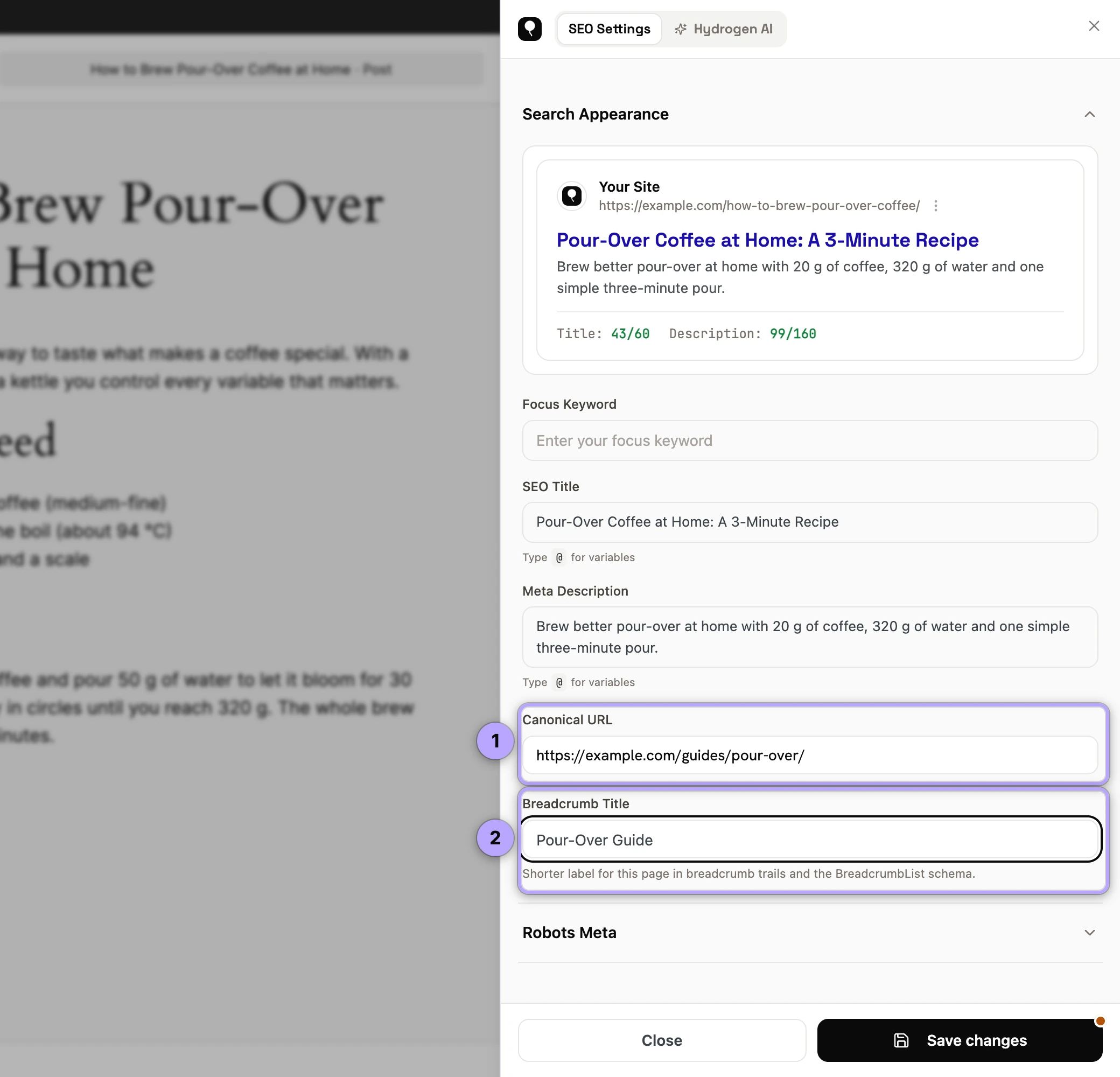

To revert to the default self-referencing canonical, clear the field and save.
Common mistakes
- Canonicalizing to a redirect or a 404. The target must be a live, indexable 200 page. Pointing at a URL that redirects or errors sends mixed signals, and Google will likely ignore the tag.
- Pointing everything at the homepage. A canonical says "this content is that page." Dozens of distinct articles all claiming to be the homepage is nonsense, and Google treats it as such.
- Combining canonical with noindex. You are simultaneously saying "index that page instead" and "do not index." Pick one instruction; see robots meta settings.
- Mismatched scheme or host. Canonicals to
http://on anhttps://site, or mixing www and non-www, reintroduce the duplication you were solving. - Using canonical when you mean redirect. If the old URL should stop existing for visitors too, a 301 is the right tool; see 301 vs 302 redirects.
- Two plugins printing canonicals. Two SEO plugins active at once can output duplicate or conflicting canonical tags. Keep one primary; see fixing duplicate meta output.
FAQ
Does a canonical tag pass link equity like a redirect?
When Google accepts the canonical, it consolidates signals (including links) onto the canonical URL, similarly to a redirect in effect. But it is a hint Google can decline, whereas a 301 is unambiguous. Use redirects when the duplicate URL should not exist for users at all.
Should every page have a canonical, even with no duplicates?
Yes. A self-referencing canonical is standard good practice; it preemptively neutralizes parameter and tracking-URL duplicates you did not know existed. Hydrogen SEO does this for you by default.
Can I canonicalize to a URL on a different domain?
Yes. Cross-domain canonicals are exactly how syndication is meant to be handled: the republished copy points at the original, wherever it lives.
How do I check what canonical a page is outputting?
View the page source in your browser and search for rel="canonical". Because Hydrogen SEO renders it server-side, what you see in the source is precisely what crawlers get.