Robots Meta Settings
Control indexing per post and site-wide with robots meta directives.
On this page
- The directives, briefly
- Site-wide robots settings
- Built-in rules
- Per-post controls
- When to noindex
- How robots meta interacts with robots.txt
- FAQ
- How long until a noindexed page leaves Google's results?
- Should I noindex my category pages?
- What's the difference between noindex and a canonical URL?
- I set noindex but the page is still in search results. Why?
- Related reading
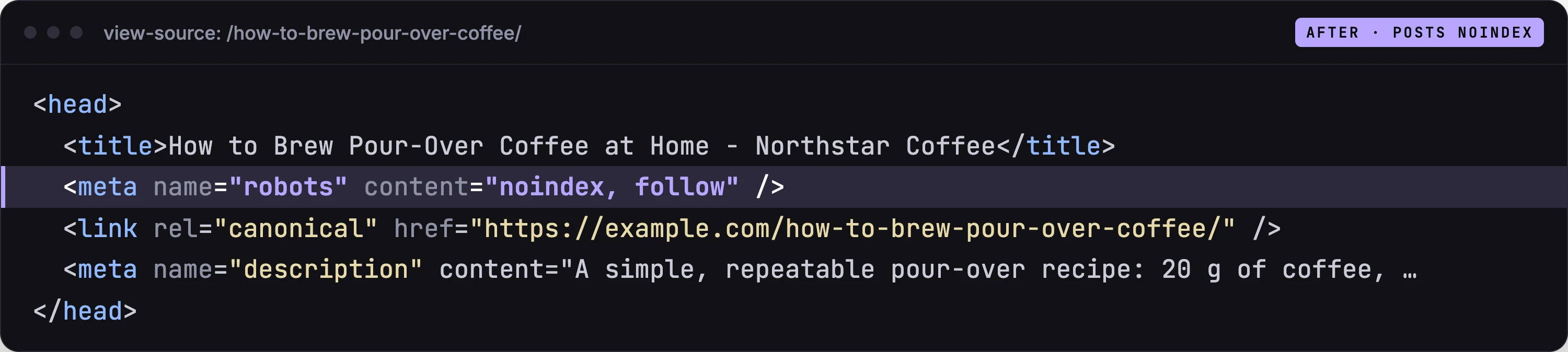
Robots meta settings control how search engines index and follow your pages, via the robots meta tag Hydrogen SEO renders in each page's head. The plugin gives you two layers: site-wide robots settings that set the defaults for each post type and taxonomy, and per-post controls in the SEO Settings sheet for overriding any individual page with directives like noindex and nofollow. Both layers output server-rendered markup, so what you set is exactly what every crawler reads.
The directives, briefly
- index / noindex: whether the page may appear in search results. noindex is the reliable way to remove a page from the index.
- follow / nofollow: whether crawlers should follow the links on the page and pass signals through them.
- noarchive: asks search engines not to offer a cached copy of the page. The page stays listed.
These three are the directives Hydrogen SEO offers, both site-wide and per post. Everything else in the tag, such as max-image-preview, is left to the search engine's defaults.
The defaults, index and follow, are correct for the overwhelming majority of your content. Robots meta settings exist for the exceptions.
Site-wide robots settings
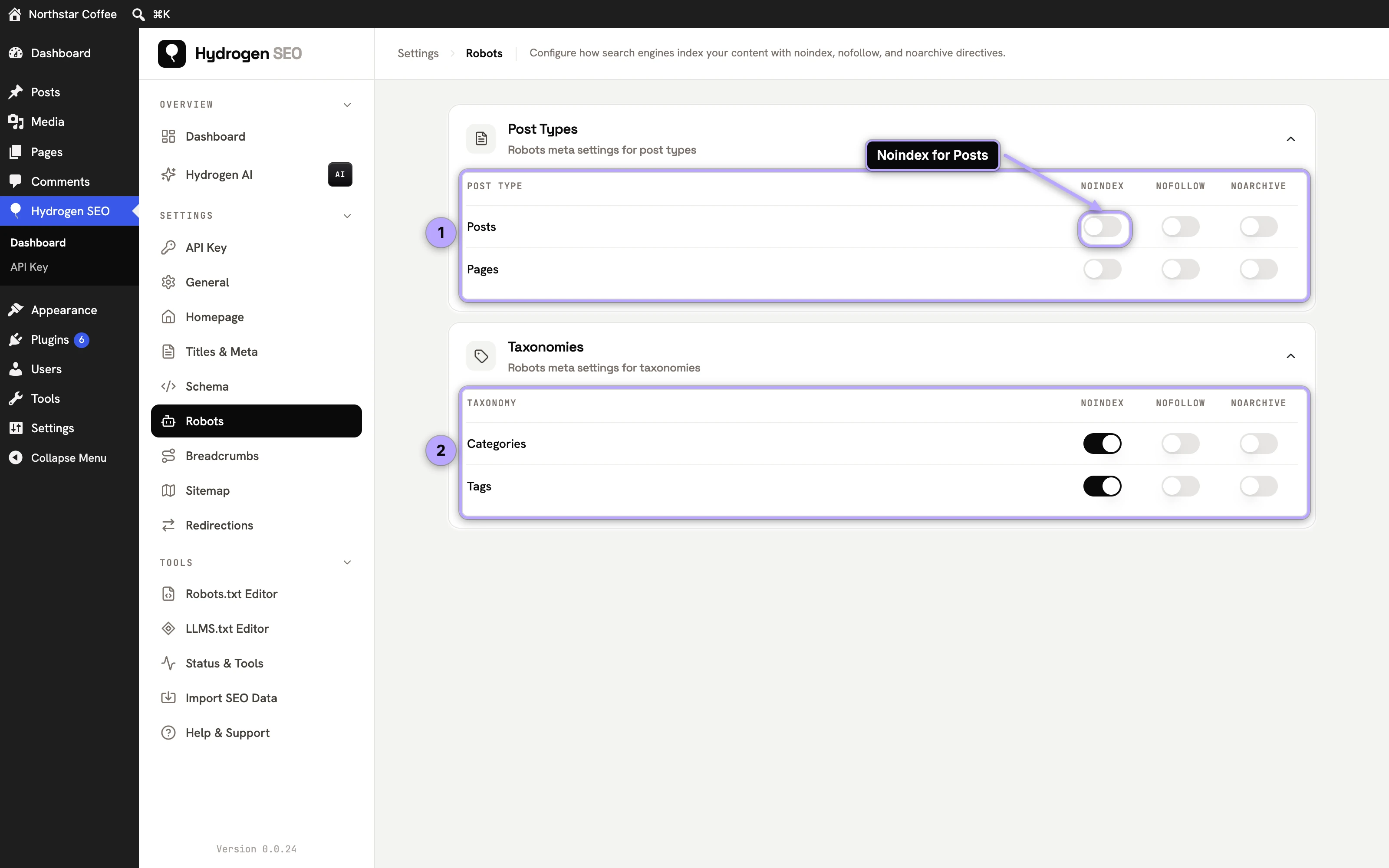
Site-wide settings live on Hydrogen SEO → Robots, in two tables: Post Types (posts, pages and any public custom post types) and Taxonomies (categories, tags and custom taxonomies), each row with a Noindex, Nofollow and Noarchive switch. This is where structural decisions belong. If you decide tag archives on your site are thin and shouldn't be indexed, set that once here rather than editing hundreds of term pages.
- Open the robots settings screen in the Hydrogen SEO menu.
- Review the defaults per post type and taxonomy.
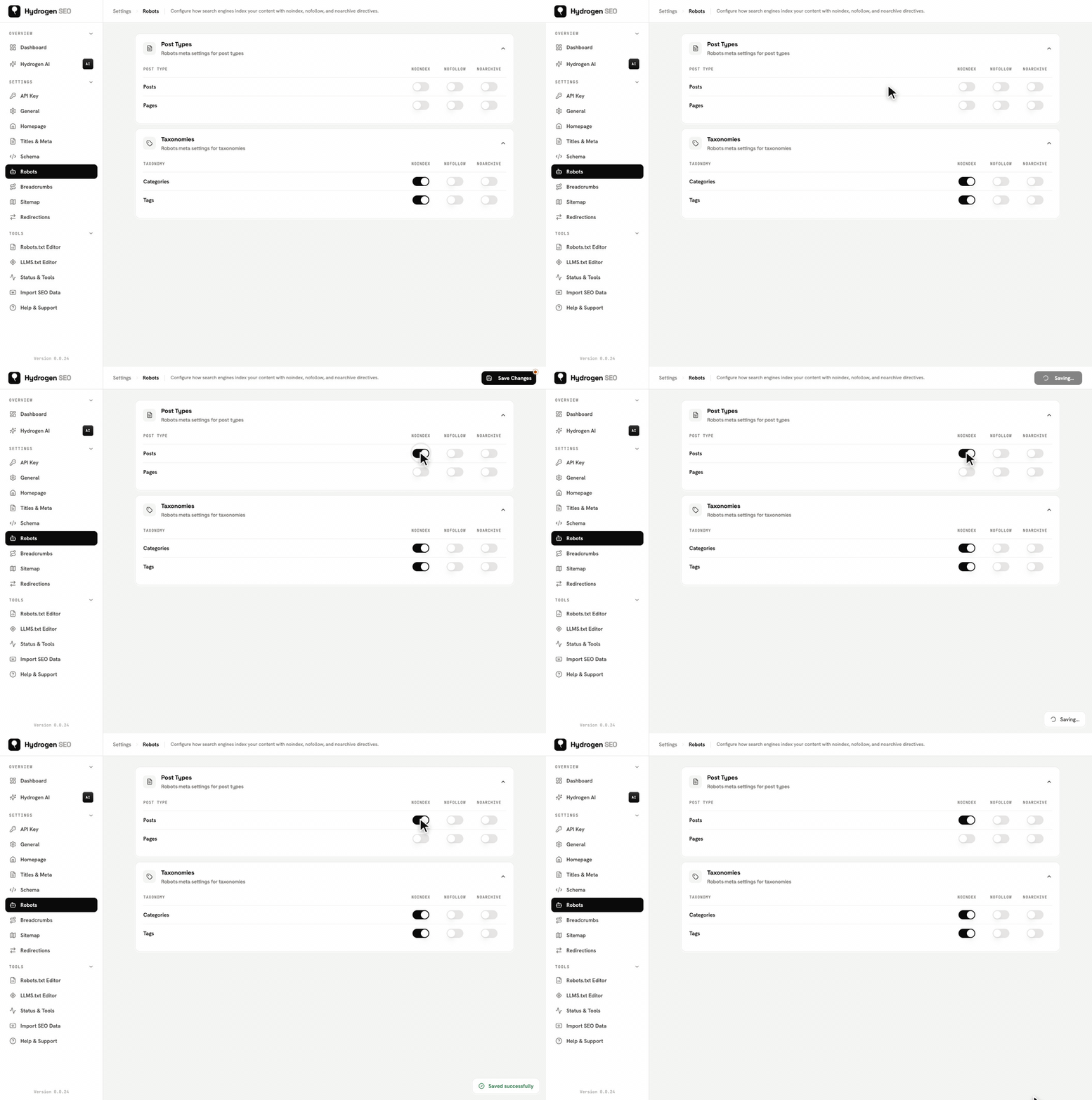
- Change the types that need it, for example setting noindex on an archive type you consider thin.
- Changes save automatically. Every page of that type now carries the directive unless individually overridden.
Built-in rules
Some pages are handled for you and are not on the Robots screen:
- Search results and the 404 page always get
noindex, follow. - Author and date archives are set on Titles & Meta → Archives (version 0.0.29 and later): Index, No index (
noindex, follow) or Disabled (a 301 to the homepage). Author archives default to No index, as they always were before 0.0.29, and date archives to Index. See author and date archives. - When Settings → Reading → Discourage search engines is checked in WordPress, every page gets
noindex, nofollow, whatever the Robots screen says. - The homepage has its own Noindex, Nofollow and Noarchive switches on the Homepage screen.
Developers can adjust defaults and output with the hydrogen_seo_robots_settings_defaults, hydrogen_seo_robots_data, and hydrogen_seo_robots_directives filters in the filters reference.
Per-post controls
Any individual post or page can override its type's default:
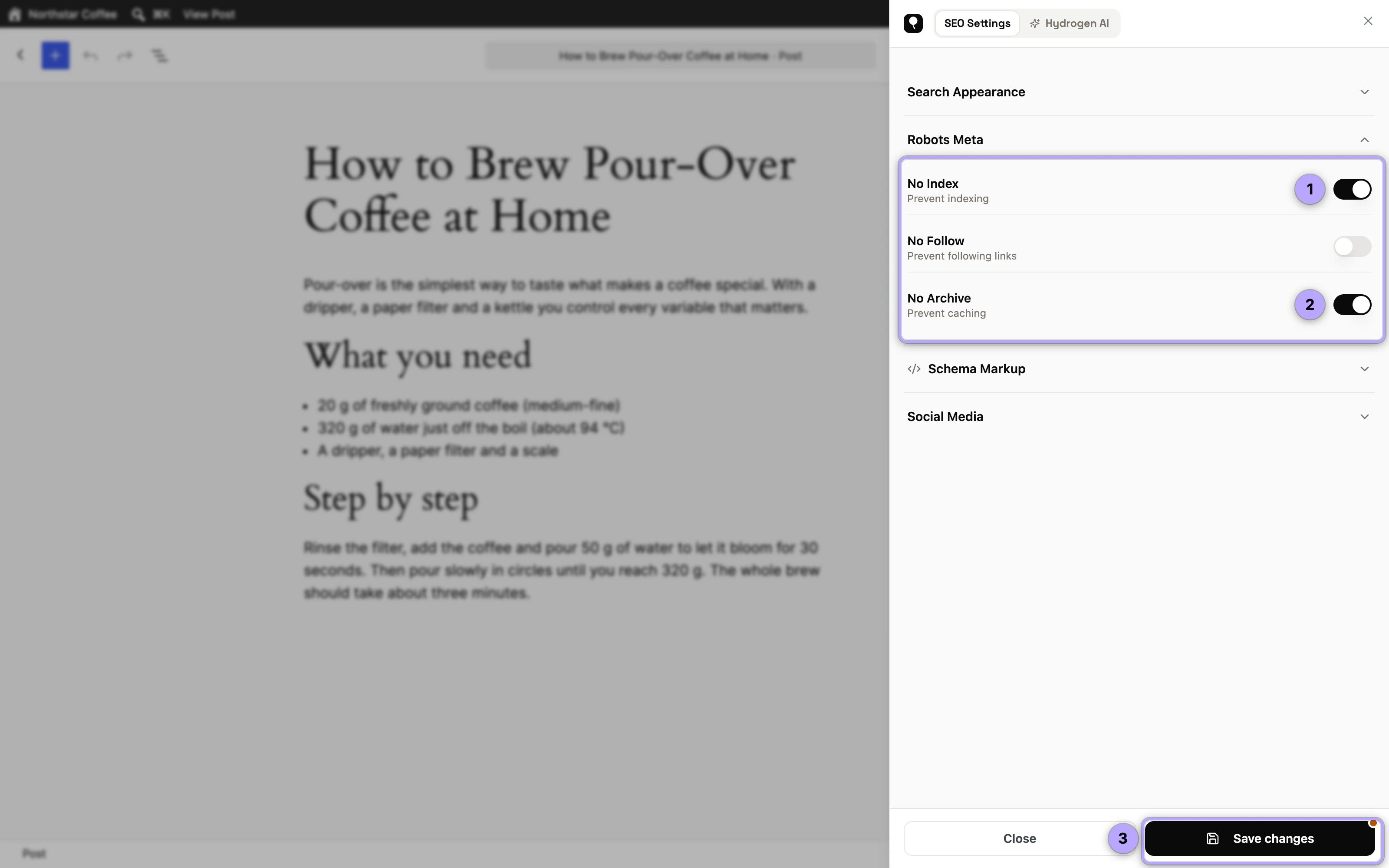
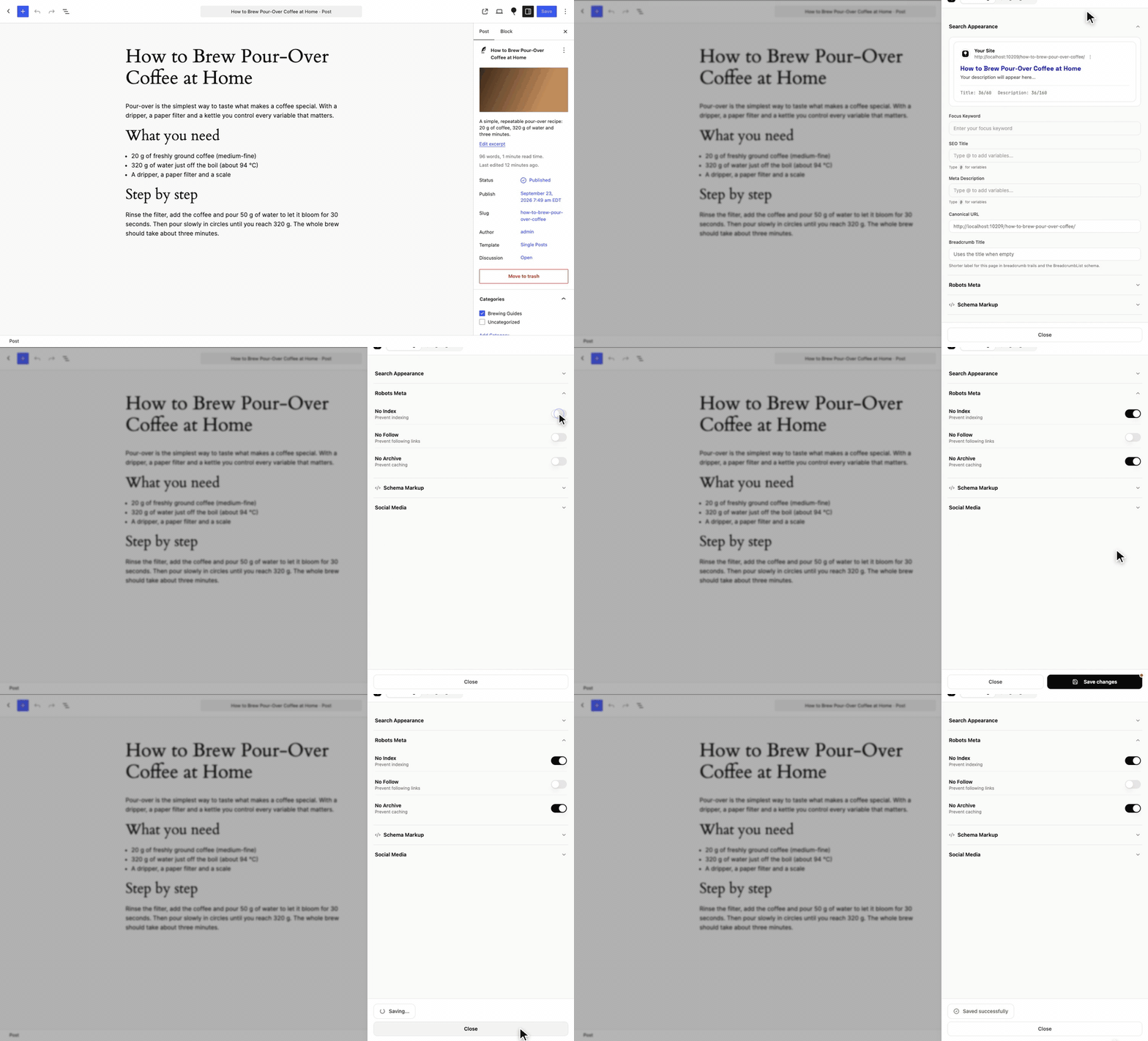
- Open the post in the editor and open the SEO Settings sheet.
- Open the Robots Meta section.
- Switch on No Index, No Follow or No Archive for this page, for example No Index for a thank-you page.
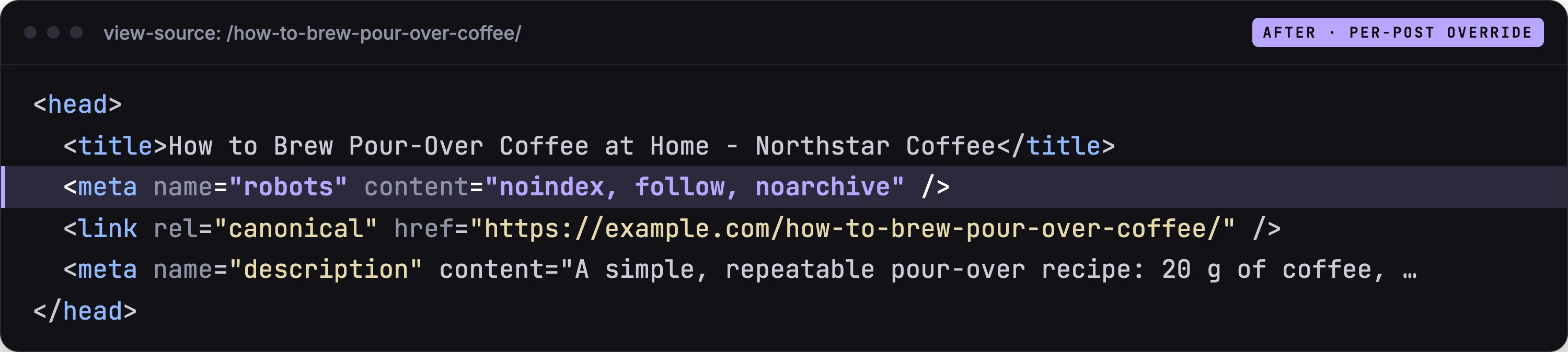
- Save the post. The robots meta tag on that URL now reflects your choice.
From the post list you can do the same without opening the editor (version 0.0.28 and later). In Quick Edit, the Hydrogen SEO group has an Indexing choice: Default (the post type's setting, shown in brackets), Index or No index. Bulk Edit applies one of those to every selected post, and the No index option in the list's SEO filter shows every post that is currently noindexed, whether by its own setting or its type's. See SEO on the Posts screen.
Per-post controls always win over site-wide defaults, which is the point: defaults describe the rule, the post panel handles the exception.
When to noindex
noindex is for pages that are legitimately part of your site but have no business competing in search results:
- Thin archives: date archives and sparse tag pages mostly duplicate content that lives elsewhere and can dilute what you want ranked. Tags are set here on the Robots screen; date archives, and author archives (No index by default), on the Archives card of Titles & Meta.
- Thank-you and confirmation pages: nobody should land on "thanks for subscribing" from Google, and indexed ones can even distort conversion data.
- Utility pages: low-value pages with no search value. (Internal search results are already noindexed for you.)
- Duplicate-purpose pages where a canonical version exists elsewhere, though a canonical URL is often the better tool for true duplicates; see canonical URLs.
What not to noindex: anything you want traffic from, obviously, but also pages you merely find embarrassing rather than harmful. And remember that noindexed pages should also drop out of your sitemap, which Hydrogen SEO's exclusion handling covers; see XML sitemaps in Hydrogen SEO. If you're unsure which pages on your site are thin or duplicated, a site audit will surface them with evidence.
How robots meta interacts with robots.txt
This is the interaction that trips people up, so here is the rule: a crawler can only obey a robots meta tag it is allowed to read.
robots.txt (edited in the robots.txt editor) controls crawling: whether a bot may fetch a URL at all. The robots meta tag controls indexing: whether a fetched page may appear in results. They are sequential, not interchangeable:
- If a page is blocked in robots.txt, crawlers never fetch it, never see its noindex tag, and the URL can still end up indexed from external links, listed without a description.
- If a page is crawlable and carries noindex, crawlers fetch it, read the directive, and drop it from the index. This is the mechanism that actually removes pages.
So the correct recipe for "keep this page out of Google" is: noindex via robots meta, page left crawlable in robots.txt. Use robots.txt for what it is good at, keeping bots out of path spaces you don't want fetched at all, and robots meta for indexing decisions. Never point both tools at the same URL and expect them to cooperate.
FAQ
How long until a noindexed page leaves Google's results?
After Google next recrawls the page and sees the directive: typically days to a few weeks depending on crawl frequency. You can speed up an individual URL with Search Console's removal tool while the recrawl catches up.
Should I noindex my category pages?
Not by default. Category archives with real curation and traffic potential are worth indexing; thin, near-empty ones are not. Archives with no posts at all are handled for you: Noindex Empty Archives under Titles & Meta → General (on by default) gives empty category, tag and taxonomy archives noindex, unless the term has its own robots settings in its SEO Settings sheet. Judge by value, and use the site-wide settings to apply your decision per taxonomy, with per-term exceptions where warranted.
What's the difference between noindex and a canonical URL?
noindex says "keep this page out of results entirely." A canonical says "index this other URL as the primary version of this content." For true duplicates, canonicals preserve the signals; for pages that shouldn't rank in any form, noindex is right. See canonical URLs.
I set noindex but the page is still in search results. Why?
Either Google hasn't recrawled yet, or, the classic mistake, the page is blocked in robots.txt so Google can't see the directive. Check the robots.txt editor and make sure the URL is crawlable.