Local Business Schema
Put your business details in the format Google and AI assistants read.
On this page
- What Local Business schema contains
- Adding Local Business schema site-wide
- A name alone is not printed
- Adding Local Business schema to one page
- Started from the setup wizard?
- Typed fields render correctly
- Why consistent NAP matters
- Let AI draft your business details
- FAQ
- Which page should carry my Local Business schema?
- Does Local Business schema replace a Google Business Profile?
- What if my business has no fixed address?
- Do I need an account to use Local Business schema?
- Related reading
Local Business schema is structured data that identifies your business to machines: its name, address, phone number, opening hours, and location on the map. Hydrogen SEO renders it as server-side JSON-LD, and you configure it from the Schema screen (site-wide, placed by Display On rules) or a page's SEO Settings sheet (that page only), exactly like any other schema type. For a local business, it is one of the highest-value pieces of markup you can ship, because it feeds the systems that decide what shows up when someone nearby searches for what you do.
What Local Business schema contains
The core fields map to the facts a customer (or a machine) needs to find and contact you:
| Field | What it holds | Example |
|---|---|---|
| Name | The business's real-world name | "Harbor Lane Coffee" |
| Address | Street, city, region, postal code, country | "12 Harbor Lane, Portland, ME 04101, US" |
| Phone | The primary contact number | "+1-207-555-0142" |
| A public contact address | "hello@harborlane.example" | |
| Opening hours | Days and times you are open | "Mo-Fr 07:00-18:00" |
| Geo coordinates | Latitude and longitude | "43.6591, -70.2568" |
Values are printed exactly as typed. A postal code such as 04101 keeps its leading zero and is printed as text, and coordinates keep their decimals (43.6591, not 43). Versions before 0.0.27 converted number-like values on the Schema screen to whole numbers, so if you saved a Local Business or Organization address with an earlier version, open the Schema screen, check the postal code and coordinates, and save again.
Fill in what is true and leave out what does not apply. A validator will tell you if a required field is missing; see validate your rich results.
Adding Local Business schema site-wide
- Go to Hydrogen SEO → Schema.
- Add Local Business as a schema type.
- Fill in the name, address, phone, email, opening hours, and geo coordinates.
- Set Display On to where it should be printed: Entire Website, the Front Page, archives, the 404 page, and so on. For a single-location business, the front page or the entire website is the usual choice.
- Save. From then on the JSON-LD is rendered server-side on every page the Display On rules match.
- Validate a matching page with the Google Rich Results Test as described in validate your rich results.
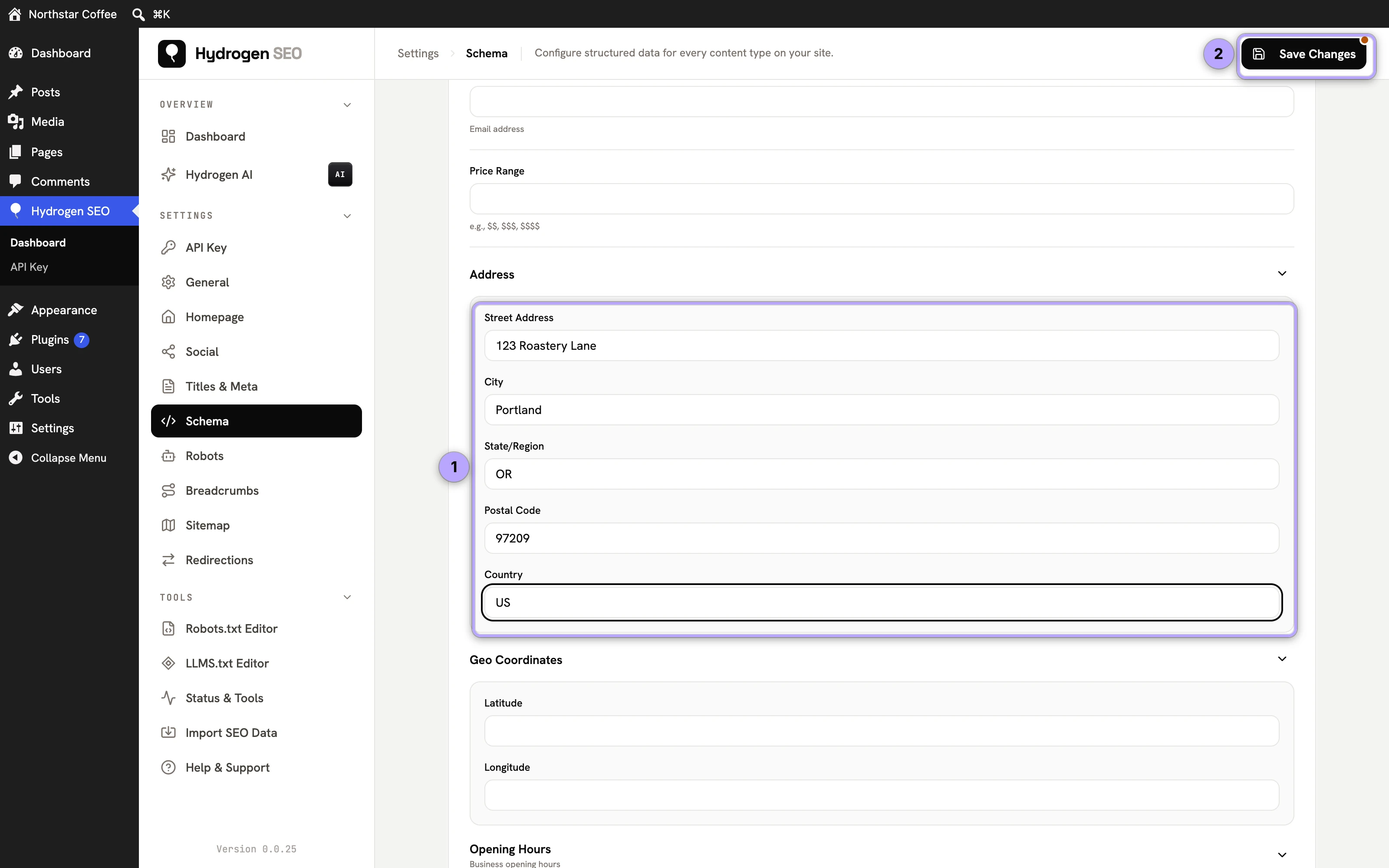
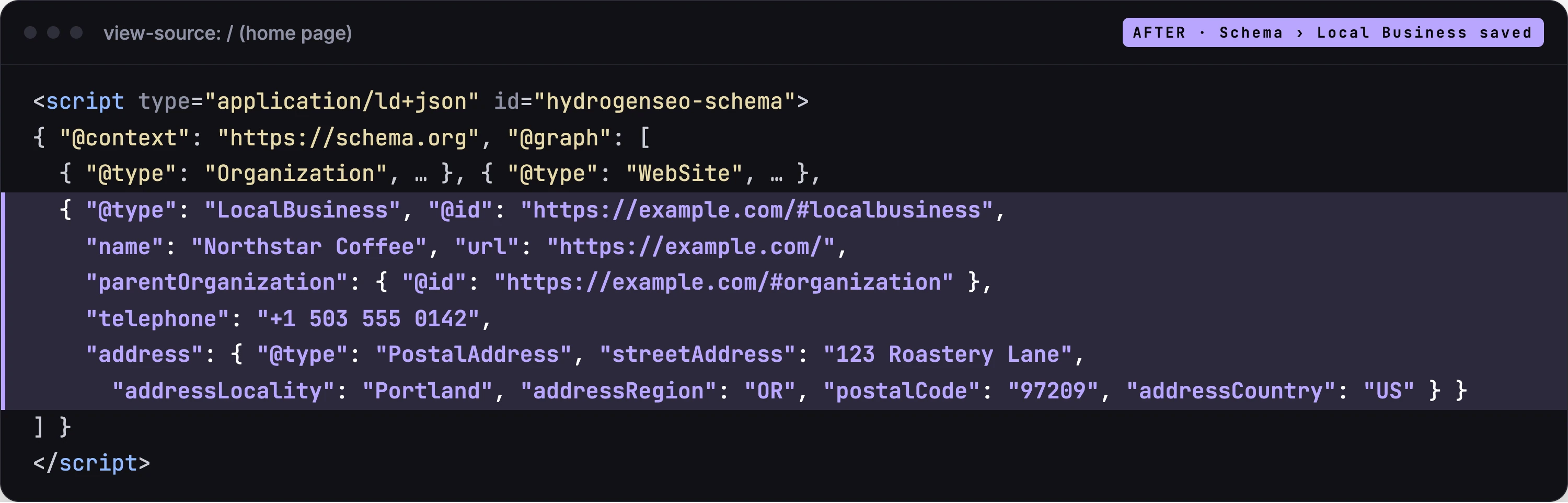
The site-wide Local Business is linked to your site's Organization with parentOrganization, so search engines read it as a location of that organization.
A name alone is not printed
The Local Business is printed only when it has real details beyond a name: an address, a phone number, opening hours, and so on. A Local Business with nothing but a name says nothing a search engine can use, so Hydrogen SEO leaves it out until you add details. If your Local Business is not showing in the page source, check that at least one of those fields is filled.
Adding Local Business schema to one page
- Open the page and its SEO Settings sheet.
- In the schema section, add Local Business and fill in the fields for that page, for example a location page's own address and hours.
- Save the page.
A Local Business added to a page this way replaces the site-wide Local Business on that page. A page never carries two Local Business entries, so a location page can state its own details even when the site-wide one is set to Entire Website.
Started from the setup wizard?
If you chose Local Business as the business type in the setup wizard's Business Profile and entered a country or city, the wizard created a Local Business entry shown on the front page. It holds only what you entered there. Open the Schema screen to add the street address, phone and opening hours.
Schema fields support smart tags, so you can type @ in a field to insert dynamic values such as %site_name% where that is genuinely the value you want.
Typed fields render correctly
As of plugin version 0.0.14, Local Business schema fields carry proper input types: date-time fields (such as opening hours), telephone fields, and email fields each render with the correct field type in the editor and output correctly formatted values in the JSON-LD. That matters more than it sounds: structured data validators are strict about formats, and a phone number or time stored as free text is a classic source of avoidable warnings. Fill the typed fields in and the output takes care of its own formatting.
Hydrogen SEO is currently in Beta, so if you spot a field behaving oddly, support wants to hear about it.
Why consistent NAP matters
NAP stands for Name, Address, Phone, and it is the backbone of local search. Search engines cross-reference your business details across every place they appear: your website's schema, your Google Business Profile, directories, and social profiles. When every source agrees, machines gain confidence that the entity is real and the details are current. When sources disagree ("Harbor Lane Coffee" here, "Harbor Lane Coffee Co." there, an old phone number in a directory), that confidence drops, and with it your local visibility.
Practical rules:
- Pick one canonical format for your name, address, and phone, and use it everywhere, character for character where possible.
- Update the schema the same day you change your hours, move, or change numbers.
- Treat your Local Business schema as the source of truth other listings should match.
Consistency also serves AI answer engines. When someone asks an assistant "is Harbor Lane Coffee open on Sunday?", the systems answering that question are far more likely to get it right if your site states the hours in machine-readable form. That is answer engine optimization at its most concrete.
Let AI draft your business details
If you would rather not fill the fields by hand, Hydrogen SEO's AI can draft Local Business schema from a plain-language description of your business: what it is, where it is, when it is open. The AI proposes the structured data, you review every field, correct anything, and save. This requires a connected free hydrogenseo.com account and uses credits; the workflow is covered step by step in AI-assisted schema.
Whether the fields are typed by you or drafted by AI, the final step is the same: validate the live page before you consider the job done.
FAQ
Which page should carry my Local Business schema?
For a single-location business, configure it once on the Schema screen with Display On set to the front page or the entire website. For multiple locations, give each location its own page with its own Local Business schema in the SEO Settings sheet; on those pages it replaces the site-wide one.
Does Local Business schema replace a Google Business Profile?
No. They are complementary. Your Business Profile is what Google displays in Maps and local packs; your schema is how your own website states the same facts in machine-readable form. Keeping the two consistent is exactly the point.
What if my business has no fixed address?
Only mark up what is true. A service-area business without a public storefront should not invent a street address; fill in the fields that genuinely apply and skip the rest. Fabricated details do more harm in local search than missing ones.
Do I need an account to use Local Business schema?
No. Like all non-AI features, it works with no account. Only the AI drafting described in AI-assisted schema needs a free hydrogenseo.com account.