Schema Types Reference
Article, Product, FAQ, HowTo, Recipe, Course, Event, Local Business and more.
On this page
Hydrogen SEO ships structured data support for Article, Product, FAQ, HowTo, Recipe, Course, Event, Local Business, and Breadcrumbs, plus additional types beyond these. Each type is selected from the Schema screen (for site-wide rules) or from a post's SEO Settings sheet (for one page), and each renders as server-side JSON-LD. This page is the reference: what every type is for, its key fields, and which pages it belongs on.
If you are new to structured data, start with the schema markup overview first. Every field below supports smart tags, so type @ to insert dynamic values like %title% or %author% from the template variables list.
Quick reference
| Type | Best for | Key fields | Typical rich result |
|---|---|---|---|
| Article | Blog posts, news, editorial pages | Headline, author, publish date, image | Article display, Top Stories eligibility |
| Product | Product and pricing pages | Name, description, price, currency, availability | Price, availability, rating snippets |
| FAQ | Pages with question-and-answer content | Question/answer pairs | None (FAQ rich results retired May 2026) |
| HowTo | Step-by-step tutorials | Name, steps, optional time and supplies | None (removed by Google in 2023) |
| Recipe | Recipe posts | Name, ingredients, instructions, times, image | Recipe cards and carousels |
| Course | Course and training pages | Name, description, provider | None (Course info retired June 2025) |
| Event | Event announcement pages | Name, start date, location, offers | Event listings with dates (physical venues only) |
| Local Business | Contact, location, homepage of local sites | Name, address, phone, hours, geo | Knowledge panel and local details |
| Breadcrumbs | Site-wide navigation trails | Page hierarchy (generated) | Breadcrumb trail in the result URL line |
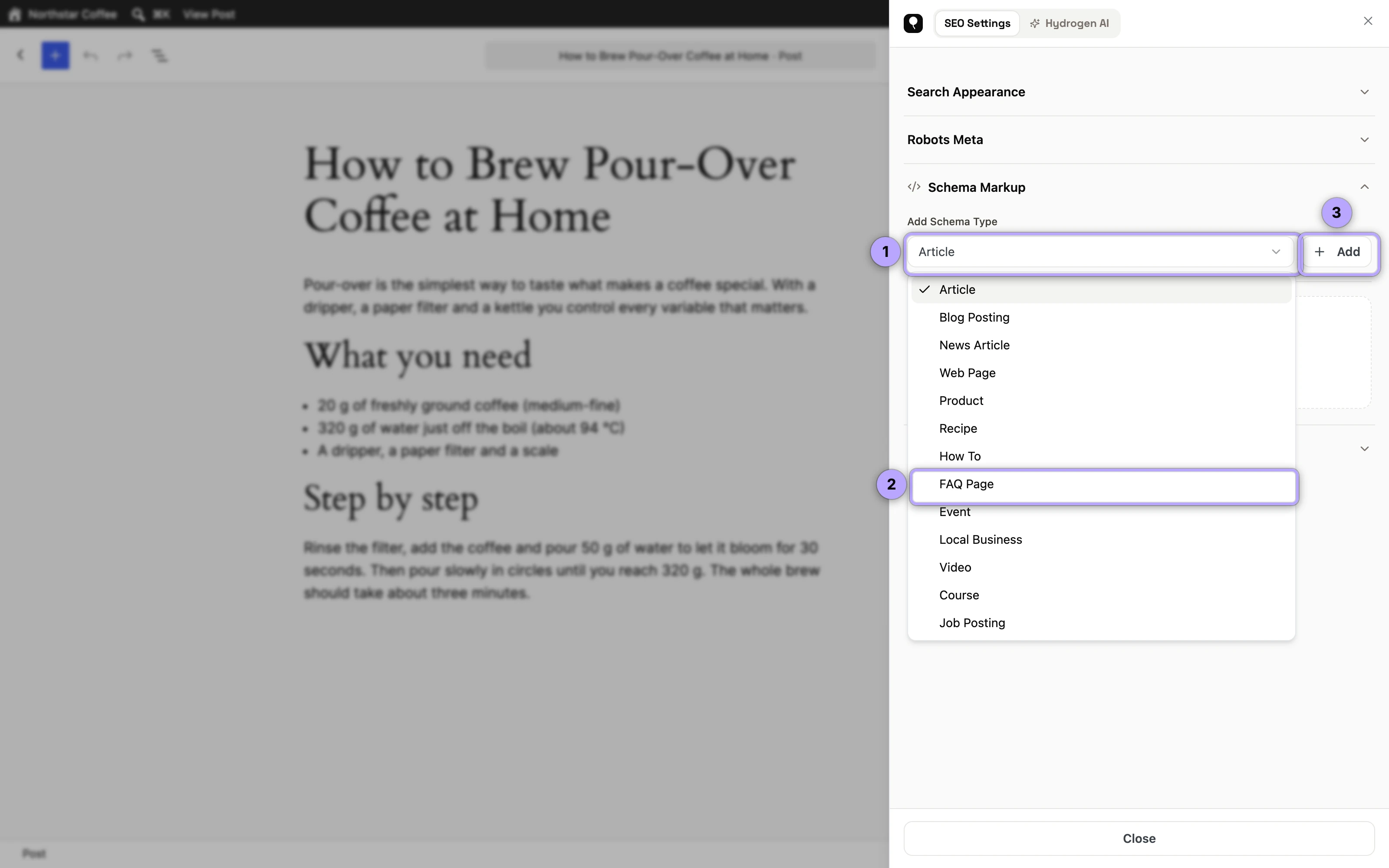
Article
Article schema tells machines a page is editorial content: who wrote it, when it was published and updated, and what it is called. Apply it site-wide to your posts from the Schema screen using smart tags (%title% for the headline, %author% for the author, %date% and %modified% for dates). It is the default workhorse type for any blog.
The author's url in Article schema is their author archive. If author archives are set to Disabled on Titles & Meta → Archives (version 0.0.29 and later), it is the website from the author's WordPress profile instead, and is left out when the profile has none, so the markup never points at an address that redirects. See author and date archives.
Use on: blog posts, news items, long-form guides.
Product
Product schema describes something you sell: name, description, price, currency, and availability. It is what makes price and availability information eligible to appear directly in search results. Keep the structured price in sync with the visible page price; mismatches are a common validation error.
Use on: individual product pages, pricing pages for a single clearly defined offer.
FAQ (FAQPage)
FAQ schema marks up question-and-answer pairs so machines can read each Q&A as a discrete unit. Google retired FAQ rich results for all sites on May 7, 2026, but the markup is still valid schema.org and still helps answer engines lift precise answers from your pages. The dedicated FAQ & HowTo schema guide covers writing good pairs.
Use on: support pages, product FAQs, any page with genuine question-and-answer content visible on the page.
HowTo
HowTo schema structures a task into named, ordered steps, with optional total time, tools, and supplies. Google removed its rich result in 2023, three years before FAQ went the same way, but the structure remains valuable for machine comprehension and answer engine optimization.
Use on: tutorials and step-by-step instructions for a physical or on-screen task. (Recipes should use Recipe instead.)
Recipe
Recipe schema is one of the most visually rewarded types in search: recipe cards can show an image, rating, cook time, and calories. Key fields include the recipe name, ingredient list, step-by-step instructions, prep and cook times, and an image.
Use on: individual recipe posts, one recipe per page.
Course
Course schema describes structured educational content: the course name, a description, and the organization providing it. Google phased out the Course info rich result in June 2025, so the markup now serves as a precise description for search engines and AI systems rather than a route to a special listing.
Use on: course landing pages, training program pages, curriculum overviews.
Event
Event schema covers anything with a start date and a place: name, start and end dates, location, and ticketing or pricing offers. Google's event listings need a physical location; its documentation says virtual experiences with no real-world component aren't supported, so a webinar-only page can carry the markup but won't be listed. Keep dates accurate; expired events with live event markup are a frequent source of Search Console warnings.
Use on: conference pages, in-person workshop and meetup announcements, concerts, and hybrid events that have a real venue.
Local Business
Local Business schema identifies a business with a physical presence: name, address, phone, opening hours, and geo coordinates. It is central to local SEO, and consistency with your other listings matters. It gets its own detailed guide: Local Business schema.
Configured on the Schema screen, it is printed site-wide wherever its Display On rules say (the entire website, the front page, archives, the 404 page and so on) and linked to your Organization with parentOrganization. It needs real details beyond a name, such as an address, phone number or hours, to be printed. A Local Business added to one page in its SEO Settings sheet replaces the site-wide one on that page.
Use on: the homepage or contact page of a local business site, individual location pages.
Organization
Organization schema, set on the Schema screen, describes who runs the site: name, logo, URL and contact details. Its sameAs list combines the Organization sameAs URLs from the Schema screen with the social profiles and X account from the Social screen, with duplicates removed.
Breadcrumbs
Breadcrumb schema exposes your page hierarchy (Home > Category > Page) so search engines can display a readable trail instead of a raw URL. Unlike the content types above, it describes structure rather than subject matter, so it can run site-wide alongside any other type.
Use on: effectively everywhere; enable it site-wide from the Schema screen.
The trail is the same one the visible breadcrumbs use, so the per-post Breadcrumb Title and primary category change both. See Breadcrumbs for the settings and how to place the trail on the page.
And more
The types above are the ones most sites need, but they are not the entire catalog. Hydrogen SEO supports additional schema types beyond this list, and developers can extend or adjust output further via the hydrogen_seo_schemas and hydrogen_seo_schema_markup filters documented in the filters reference. If you are unsure which type fits a page, describe the page in plain language and let AI-assisted schema propose a draft, then review and validate it.
FAQ
Can a page have two schema types at once?
Yes. Breadcrumbs plus a content type (Article, Product, and so on) is the standard combination, and a page can carry more where it genuinely fits, such as Local Business plus FAQ on a contact page.
Which type should my blog posts use?
Article, applied site-wide from the Schema screen with smart tags. Switch individual posts to a more specific type (HowTo, Recipe) in the SEO Settings sheet only when the content truly is that type.
What happens if I pick the wrong type?
Nothing breaks on your site, but validators will flag missing required fields, and Google simply won't show a rich result for markup that doesn't match the visible content. Fix the type, then re-check with the rich results validation guide.